Messengers
Frequently Asked Questions
Section titled “Frequently Asked Questions”From which number are messages sent in messengers?
Messages are sent from your personal number:
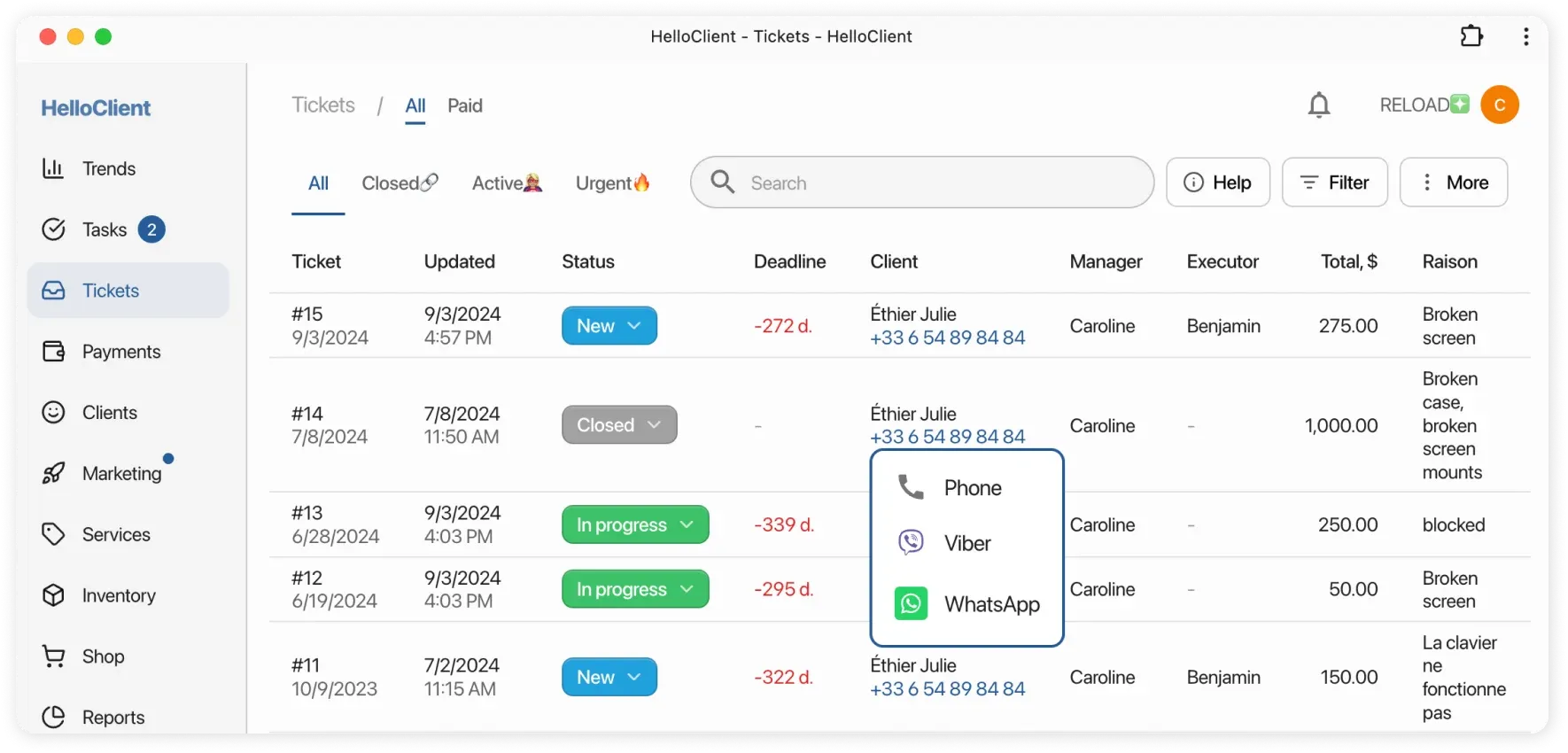
- Click on the client’s phone number in the system
- Select the icon of the desired messenger (WhatsApp, Telegram, etc.)
- The system will automatically:
- Open your messenger on the device
- Prepare a chat with the client
- The message will be sent from the number linked to your messenger
Does the client prefer notifications via messenger? No problem!
Section titled “Does the client prefer notifications via messenger? No problem!”HelloClient allows you to send messages directly to clients in messengers, which is often more convenient than SMS or calls - both for clients and managers.
How does it work?
Section titled “How does it work?”- Hover over the clientr’s phone number
- Select a messenger (WhatsApp, Telegram, Viber) from the icons that appear
- Send your message - the web version of the messenger will open with a pre-prepared chat to the client
Advantages:
- Communication convenience in the client’s preferred format
- Instant sending of documents, photos, or links
- Conversation history is saved in the messenger